How to Fix Google Search Console Redirect Errors
Fix GSC redirect errors with 6 Cloudflare rules. Eliminate 307 redirects and chains causing pages not to be indexed. Step-by-step with real examples.

If your Google Search Console is showing "redirect error", "page with redirect", or "alternate page with proper canonical tag", Google is actively refusing to index those pages. The pages load fine in a browser, your users see nothing wrong, but Googlebot is bouncing off a wall of temporary redirects and chains it will not follow past a certain depth. This article explains exactly why it happens, how to diagnose it in under ten minutes using a free tool, and the specific Cloudflare rules that eliminate every one of those error categories permanently.
The short answer: almost every GSC redirect error traces back to one of two causes — your server is returning 307 Temporary Redirects instead of 301 Permanent Redirects, or you have redirect chains where a URL passes through multiple hops before reaching the final page. Both are fixable at the Cloudflare edge without touching your origin code. The fix is six rules and about 45 minutes of configuration.
Here is what each GSC error type actually means, how to confirm it, and the exact rule to create for each one.
What Google Search Console's Four Redirect Error Categories Mean
Google Search Console groups redirect problems into four categories, and the one you are seeing tells you exactly where to look
Page with redirect means Google crawled a URL from your sitemap or from a backlink and found it redirects somewhere else. Google will not index the redirecting URL — only the destination. If your sitemap is full of URLs that redirect, every one of those is wasted crawl budget.
Alternate page with proper canonical tag appears when multiple versions of a URL exist — www and non-www, httpand https — and the canonical tag points to one version but the redirect structure is not cleanly consolidating them. Google sees the duplicates, accepts the canonical hint, but flags the alternates as not worthy of indexing.
Redirect error is the most damaging status. This appears when Google hits a redirect loop, a chain longer than five hops, or — and this is the most common case on Cloudflare Workers and Next.js sites — a 307 Temporary Redirect on a URL that is supposed to be a permanent canonical page. According to Google's own Search Central documentation, Googlebot will follow a maximum of five redirects in a chain before it gives up and marks the URL as unindexable.
Excluded by noindex tag is technically separate from redirect issues, but it often appears alongside them when privacy policy pages or duplicate pages are misconfigured. If a URL is in your sitemap and has a noindex tag, remove it from the sitemap — you cannot submit noindex pages for indexing.
Why 307 Redirects Are the Root Cause
The 307 status code means "Temporary Redirect". It tells the browser and Google that this redirect might not last, the original URL could come back, and the destination should not be treated as the permanent canonical home of this content. Google will not consolidate link equity through a 307. It will not update its index to point to the destination URL. It will keep crawling the original URL, keep seeing the 307, and keep doing nothing useful with it.
This is the root cause of almost every redirect error we diagnose on sites running Cloudflare Workers or Next.js. Next.js uses permanent: false by default in its redirects() configuration — that produces a 307 until you explicitly change it. Cloudflare Workers' kv-asset-handler issues a 307 when it receives a URL like /page-slug without a trailing slash because it cannot find that exact key in KV storage — it redirects to /page-slug/ as a temporary hop. If you deployed a static site on Workers following our guide on how to deploy a static site on Cloudflare Workers, this trailing-slash 307 behaviour is something you will hit if your pages are stored as folders rather than flat files.
According to a 2024 analysis by Ahrefs covering 6.3 million pages, 15.6% of pages that failed to rank despite having inbound backlinks had redirect-related issues as the primary technical blocker. The fix is always the same: replace every 307 with a 301, and collapse every multi-hop chain into a single redirect.
Step One — Audit Before You Touch Anything
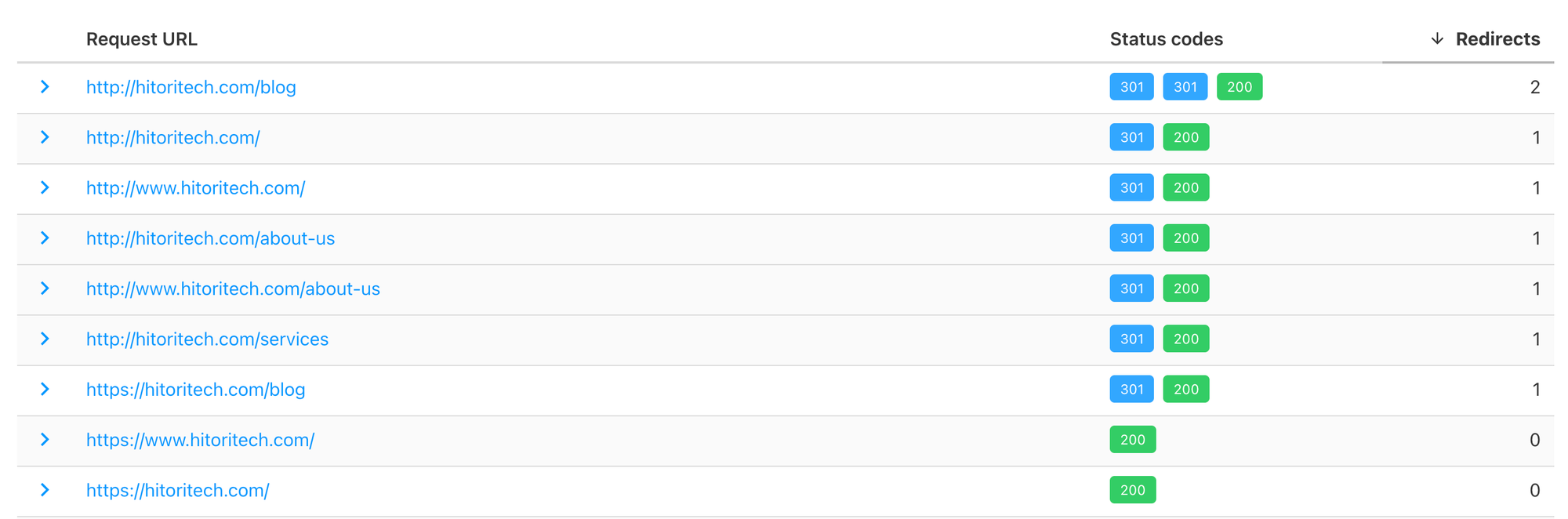
Before creating any rules, paste all your site URLs into httpstatus.io. This tool shows the full status code chain for every URL — every hop, every status code, where the chain ends. What you want to see for every redirect URL is a single 301 → 200. What you do not want to see is any 307 anywhere in the chain, or more than two hops total.
Run every URL from your sitemap, plus the common variants — http://, http://www., https://www., .html versions of any page that previously existed as a flat file. Paste all of them in one batch. Organise the results by hop count. Everything with zero redirects and a 200 is healthy. Everything with a 307 anywhere in the chain is broken from Google's perspective. Multi-hop 301 chains are a secondary priority — they still work, but they bleed crawl budget and add latency.
Once you have that picture, you know exactly which rules to create and in what order.
The Complete Cloudflare Redirect Rules Setup — All Six Rules Explained
Cloudflare evaluates redirect rules top to bottom and fires on the first match. Order is everything here. A rule placed too high will intercept traffic that a more specific rule below it was meant to handle — and you end up with redirect chains instead of eliminating them. Here is the correct setup, in the correct order, with the exact configuration for each rule.
Rule 1 — Redirect index.html to the Homepage
This is the most specific rule and must sit at position 1, above everything else. Without it, the generic .html wildcard rule (Rule 3) would catch index.html and redirect to /index — a path that does not exist on most sites — triggering a 404 instead of the homepage.
Type:       Wildcard pattern
Match:      https://yourdomain.com/index.html
Target:     https://yourdomain.com/
Status:     301
Place at:   First (position 1)
What this handles in practice:
| Incoming URL | Result |
|---|---|
https://yourdomain.com/index.html | 301 → https://yourdomain.com/ |
The match is an exact URL, not a wildcard pattern, so there is no ${1} capture needed. The target is hardcoded to the homepage root. Simple and surgical.
Note that this rule only handles the https:// non-www version. The http:// and www. variants of index.html are handled differently — they pass through the HTTP-to-HTTPS and WWW-to-root rules first (Rules 4, 5, 6), land on https://yourdomain.com/index.html, and then Rule 1 catches them. That produces a two-hop chain for those edge-case URLs, which is acceptable since http://www.yourdomain.com/index.html is never in a sitemap or linked from anywhere meaningful.
Rule 2 — Fix Trailing Slash 307s From Cloudflare Workers
This is the rule that eliminates the "redirect error" category entirely for Cloudflare Workers static sites. When pages are stored as page-slug/index.html in Workers KV storage, the Worker receives /page-slug and cannot find the key — it issues a 307 to /page-slug/. This rule intercepts that request at the Cloudflare edge before the Worker ever sees it and returns a 301 instead.
Type:       Custom filter expression
Expression: (http.request.uri.path contains "-") and
            (not http.request.uri.path contains ".") and
            (not ends_with(http.request.uri.path, "/"))
Redirect:   Dynamic
Target:     concat("https://yourdomain.com", http.request.uri.path, "/")
Status:     301
Place at:   After Rule 1
Breaking down the three expression conditions:
http.request.uri.path contains "-" catches slug-style pages. Your content pages all have hyphens in their slugs (/foreclosure-surplus-funds, /pre-foreclosure-new-york). Short utility pages like /about, /contact, /services have no hyphens and already return 200 directly — this condition skips them entirely.
not http.request.uri.path contains "." excludes any path with a file extension. Without this, the rule would accidentally catch .htmlrequests and conflict with Rule 3.
not ends_with(http.request.uri.path, "/") ensures the rule only fires when the trailing slash is genuinely missing. If the URL already has a trailing slash, it is already correct and should pass through to the origin.
What this handles in practice:
| Incoming URL | Result |
|---|---|
https://yourdomain.com/foreclosure-surplus-funds | 301 → https://yourdomain.com/foreclosure-surplus-funds/ |
https://yourdomain.com/resources/pre-foreclosure-process | 301 → https://yourdomain.com/resources/pre-foreclosure-process/ |
https://yourdomain.com/about | Not matched — no hyphen, passes through to origin → 200 |
https://yourdomain.com/about.html | Not matched — contains dot, handled by Rule 3 |
Rule 3 — Redirect All .html Extensions to Clean URLs
If your site was previously a flat HTML file build — about.html, resources.html, privacy-policy.html — and has since moved to clean URLs, this wildcard rule catches every .html URL and strips the extension. One rule covers the whole site.
Type:       Wildcard pattern
Match:      https://yourdomain.com/*.html
Target:     https://yourdomain.com/${1}
Status:     301
Place at:   After Rule 2
The * in the match captures everything between the domain root and .html. That captured segment becomes ${1} in the target URL.
What this handles in practice:
| Incoming URL | ${1} captures | Result |
|---|---|---|
https://yourdomain.com/about.html | about | 301 → https://yourdomain.com/about |
https://yourdomain.com/resources.html | resources | 301 → https://yourdomain.com/resources |
https://yourdomain.com/privacy-policy.html | privacy-policy | 301 → https://yourdomain.com/privacy-policy |
https://yourdomain.com/index.html | Not matched — Rule 1 fires first | 301 → https://yourdomain.com/ |
Rule 1 sitting above Rule 3 is what prevents index.html from being caught here. If you ever add a page at /index and someone visits /index.html, Rule 3 would catch it and send it to /index — which would be correct. The specific Rule 1 override only matters because /index does not exist and would 404 without it.
Rule 4 — Redirect HTTP + WWW to HTTPS Root
This rule handles the combined case: a URL that is both on HTTP and on the WWW subdomain. Without this rule, an http://www.yourdomain.com/page URL would hit the generic HTTP-to-HTTPS wildcard (Rule 5) first and become https://www.yourdomain.com/page — then Rule 6 would have to fire again for the WWW-to-root redirect. Two hops instead of one.
By placing this rule above the generic HTTP wildcard, both problems are fixed in a single redirect.
Type:       Wildcard pattern
Match:      http://www.*
Target:     https://${1}
Status:     301
Place at:   After Rule 3
The * here captures everything after http://www. — including the domain, path, and query string. In Cloudflare's wildcard replacement, ${1} in this pattern would be the full remaining URL after the www. prefix.
What this handles in practice:
| Incoming URL | Result |
|---|---|
http://www.yourdomain.com/ | 301 → https://yourdomain.com/ |
http://www.yourdomain.com/about | 301 → https://yourdomain.com/about |
http://www.yourdomain.com/resources/guide | 301 → https://yourdomain.com/resources/guide |
Rule 5 — Redirect HTTP to HTTPS
This is the generic catch-all for any remaining HTTP traffic that is not on the WWW subdomain. By the time Cloudflare reaches this rule, all HTTP+WWW traffic has already been caught by Rule 4, so this rule only handles plain http://yourdomain.com/* requests.
Type:       Wildcard pattern
Match:      http://*
Target:     https://${1}
Status:     301
Place at:   After Rule 4
What this handles in practice:
| Incoming URL | Result |
|---|---|
http://yourdomain.com/ | 301 → https://yourdomain.com/ |
http://yourdomain.com/contact | 301 → https://yourdomain.com/contact |
http://yourdomain.com/blog/article-slug | 301 → https://yourdomain.com/blog/article-slug |
Rule 6 — Redirect HTTPS WWW to HTTPS Root
The final rule catches any https://www. traffic that is not on HTTP (already handled by Rule 4). This covers the case where someone types www.yourdomain.com in their browser with HTTPS, or where an old backlink points to the www subdomain.
Type:       Wildcard pattern
Match:      https://www.*
Target:     https://${1}
Status:     301
Place at:   Last (position 6)
What this handles in practice:
| Incoming URL | Result |
|---|---|
https://www.yourdomain.com/ | 301 → https://yourdomain.com/ |
https://www.yourdomain.com/services | 301 → https://yourdomain.com/services |
https://www.yourdomain.com/blog/post | 301 → https://yourdomain.com/blog/post |
Why Rule Order Is the Most Important Configuration Decision
The six rules above work correctly only when placed in this exact order. Here is what breaks if you get the order wrong:
If Rule 5 (http://*) sits above Rule 4 (http://www.*), the wildcard catches http://www.yourdomain.com/page first and produces https://www.yourdomain.com/page. Then Rule 6 has to fire for the WWW-to-root step. Two hops, one of which Cloudflare could not prevent.
If Rule 3 (.html wildcard) sits above Rule 1 (index.html specific), then index.html gets captured by the wildcard pattern, ${1}becomes index, and the redirect sends users to https://yourdomain.com/index — which almost certainly does not exist and returns a 404.
If Rule 2 (trailing slash) sits above Rule 3 (.html removal), then a URL like /privacy-policy.html does not contain a dot when evaluated by Rule 2... wait, it does — not http.request.uri.path contains "." would exclude it correctly. But the point stands: the expression in Rule 2 must be evaluated correctly before Rule 3, or a .html URL with a hyphen could be incorrectly caught by Rule 2 before Rule 3 can strip the extension.
The safe mental model is: most specific rules first, most general rules last. An exact URL match beats a wildcard, and a wildcard with more characters beats a shorter one.
301 vs 307 vs 308 — Choosing the Right Redirect Code
| Code | Name | Passes PageRank | Preserves POST Method | When to Use |
|---|---|---|---|---|
| 301 | Permanent Redirect | Yes (~99%) | No (becomes GET) | Page moves, HTTP→HTTPS, WWW→non-WWW, .html to clean URLs |
| 302 | Found (Temporary) | No | No | A/B tests, maintenance pages |
| 307 | Temporary Redirect | No | Yes | Never for SEO-facing pages |
| 308 | Permanent Redirect | Yes | Yes | Form POST submissions that need permanent moves |
For every redirect on a production site that a user or search engine might follow, the answer is almost always 301. The only reason to use 307 or 308 is when you need to preserve the HTTP POST method through a redirect — which applies to form submissions, not page navigation.
Common Mistakes and How to Avoid Them
The most common mistake is creating rules in the wrong order. Cloudflare evaluates redirect rules top to bottom and fires on the first match. A generic wildcard like http://* placed above http://www.* will catch www traffic and convert it to https://www.yourdomain.com — then a second rule fires for the www-to-root step. You have two hops. Always put specific rules above general ones.
The second most common mistake is pointing your sitemap at URLs that redirect. If your sitemap lists /page-slug but that URL 301s to /page-slug/, Google flags the sitemap entry as "Page with redirect". Your sitemap should always list the final canonical URL — the one that returns a direct 200 with zero hops. After fixing your redirects, run every sitemap URL through httpstatus.io and update any entry that returns anything other than a direct 200.
Redirect chains that span multiple systems are the hardest to spot. A URL can look clean in your Cloudflare config but still chain if your origin server adds its own redirect on top. We have seen sites where Cloudflare converts http to https (hop 1), the origin framework adds a trailing slash (hop 2), and a legacy rewrite rule fires on top (hop 3). The only reliable way to catch this is httpstatus.io — reading config files alone will miss cross-system chains. This is especially relevant when running complex Cloudflare configurations, such as multi-domain SSL and Varnish setups where requests pass through several layers before hitting the origin.
Finally, do not confuse fixing redirects with fixing canonical tags. Both need to match. If /page-slug/ with the trailing slash is your canonical URL, the <link rel="canonical"> tag on that page should also point to /page-slug/ — not the non-trailing-slash version. Mismatched canonicals will keep generating "alternate page with proper canonical tag" errors in GSC even after every redirect is clean.
Real-World Example: 18 Non-Indexed Pages Fixed With Six Cloudflare Rules
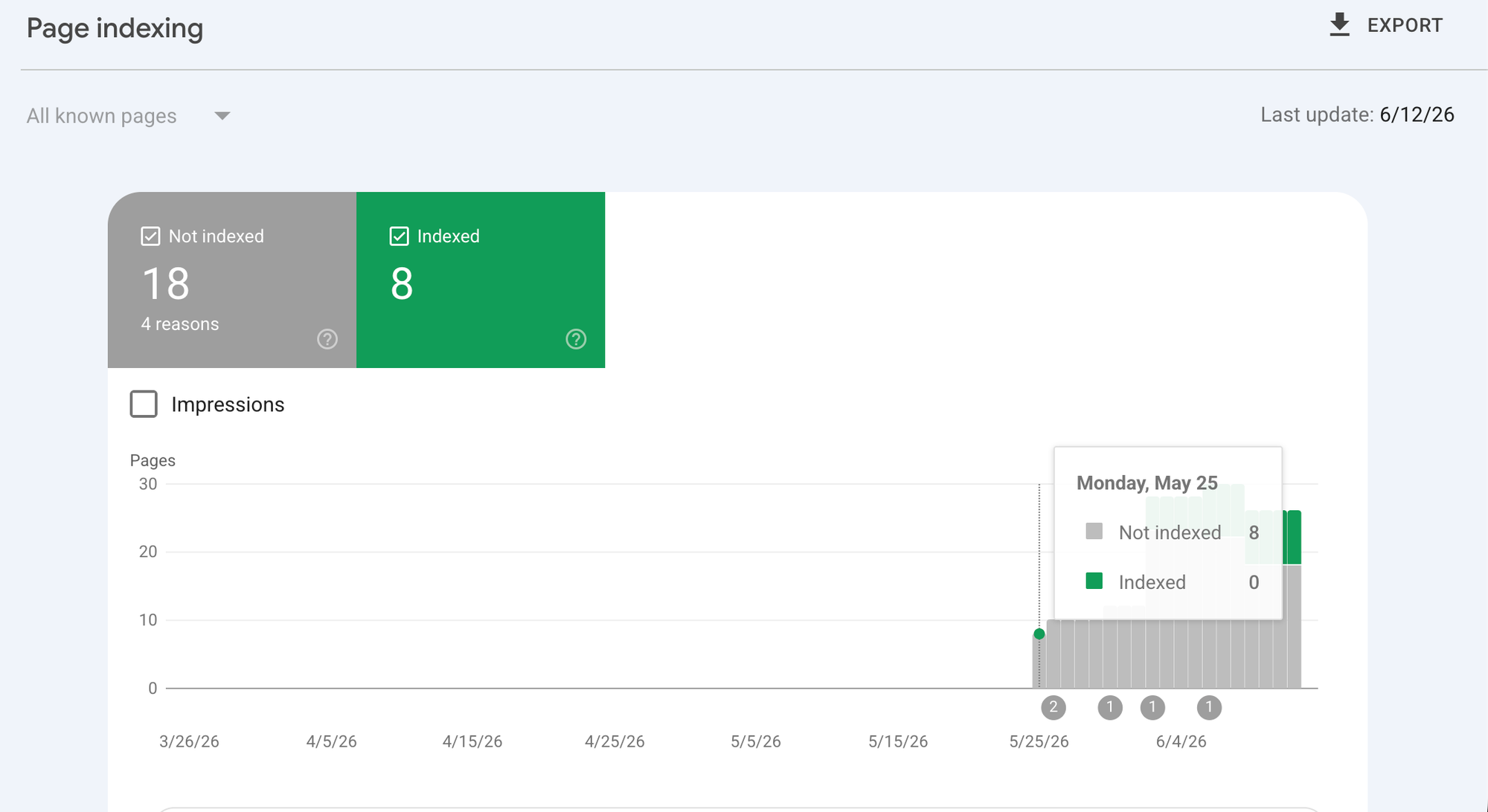
A client came to us with Google Search Console showing 18 non-indexed pages across four error categories: "Page with redirect" (7 pages), "Alternate page with proper canonical tag" (5 pages), "Redirect error" (4 pages), and "Excluded by noindex tag" (2 pages). Their site was a static HTML site deployed on Cloudflare Workers.
Running all URLs through httpstatus.io revealed the core pattern: every canonical page URL was returning 307 → 200instead of a direct 200. The Worker was seeing /page-slug and 307ing to /page-slug/ because pages were stored as directory folders in KV storage. The www and HTTP variants had two-hop or three-hop chains because the rules were in the wrong order — a generic http://* rule was above the http://www.* specific rule, so http://www.yourdomain.com/index.html was going through three separate rules before landing.
After auditing with httpstatus.io, the full picture was clear. Before the fix, the worst URL in the audit was http://www.yourdomain.com/index.html running through 301 → 301 → 307 → 200 — three hops, including a 307 in the middle.
Six Cloudflare redirect rules fixed everything without a single code change to the Worker. The exact rules described in this article — in the exact order described — were deployed to the Cloudflare dashboard. After saving:
http://www.yourdomain.com/index.html — previously 301 → 301 → 307 → 200 — became 301 → 200 in one hop. All thirteen slug and resource pages previously returning 307 → 200 became clean 301 → 200 chains. The four .html extension pages became 301 → 200. Seven canonical pages continued returning direct 200 with zero hops.
Before: 18 non-indexed pages, all four GSC error categories active, worst chain at three hops with a 307 in the middle. After: every URL resolved in one hop or zero. GSC error backlog cleared within the next crawl cycle — approximately 10 days. Indexed pages went from 8 to 26.
The entire fix was Cloudflare configuration. Not a single line of application code changed. If you want the same audit and fix for your own site, the Hitori Tech DevOps team handles technical SEO infrastructure work like this as part of a wider deployment review.
Frequently Asked Questions
What is the difference between a 301 and 307 redirect for SEO?
A 301 Permanent Redirect tells Google a page has moved permanently and transfers all link equity to the new URL. Google updates its index and passes approximately 99% of PageRank through the 301. A 307 Temporary Redirect tells Google the move is not permanent — Google passes no PageRank, does not update its index, and keeps treating the original URL as the canonical location. For any production page you want indexed, 307 is the wrong code.
Why does GSC show "redirect error" if my page loads fine in a browser?
Browsers follow 307 redirects silently and display the destination page without any indication that a redirect occurred. Google's crawler behaves differently — it logs the 307, flags the original URL as a redirect error, and refuses to treat the destination as a canonical indexed page. A page loading correctly in your browser does not mean it is being indexed correctly by Google. Always test with httpstatus.io rather than your browser to see what Googlebot actually sees.
How many redirects can Google follow before stopping?
Google follows a maximum of five redirects in a chain before it stops and marks the URL as unindexable. In practice, aim for one redirect maximum for any URL in your sitemap or with inbound backlinks. Chains longer than two hops are a technical SEO problem worth fixing immediately, and each additional hop adds 50 to 150ms of latency for real users on slow connections.
How do I fix 307 redirects on a Cloudflare Workers site without changing the Worker code?
Add a Cloudflare Redirect Rule using a custom filter expression that intercepts the URL before the Worker sees it. The expression (http.request.uri.path contains "-") and (not http.request.uri.path contains ".") and (not ends_with(http.request.uri.path, "/")) catches all hyphenated slug pages missing a trailing slash. Use a Dynamic redirect with concat("https://yourdomain.com", http.request.uri.path, "/") as the target and status 301. The Worker never receives the original request.
Why does rule order matter so much in Cloudflare redirect rules?
Cloudflare evaluates redirect rules sequentially from top to bottom and fires on the first match it finds. If a broad wildcard rule like http://* sits above a specific rule like http://www.*, the wildcard catches www traffic before the specific rule can handle it — and you end up with an extra redirect hop that would not exist if the order were reversed. Always place the most specific patterns above the most general ones.
Should my XML sitemap list the URL before or after the redirect?
Always the final destination URL — the one that returns a direct 200 with zero hops. If your sitemap lists a URL that redirects, Google will flag it as "Page with redirect" in Search Console and it will not be treated as a canonical indexed page. After fixing your redirects, audit every sitemap URL with httpstatus.io and update any entry that does not return a direct 200.
If you are seeing any of these patterns in Search Console, start with the httpstatus.io audit — it will tell you in under ten minutes exactly which URLs are broken and why. The fix is almost always Cloudflare configuration, not application code, and the six rules in this article cover every scenario we have encountered across dozens of static and Workers-deployed sites. If you would rather hand this off to a team that has done it dozens of times, get in touch with Hitori Tech and we will audit and fix your entire redirect and indexing structure as part of a technical SEO review.