AI Personal Stylist App Architecture Explained
A full engineering breakdown of how an AI personal stylist app can combine MediaPipe, Gemini, Fal.ai Flux, FastAPI, PostgreSQL, React, Ghost CMS, and SSE streaming.

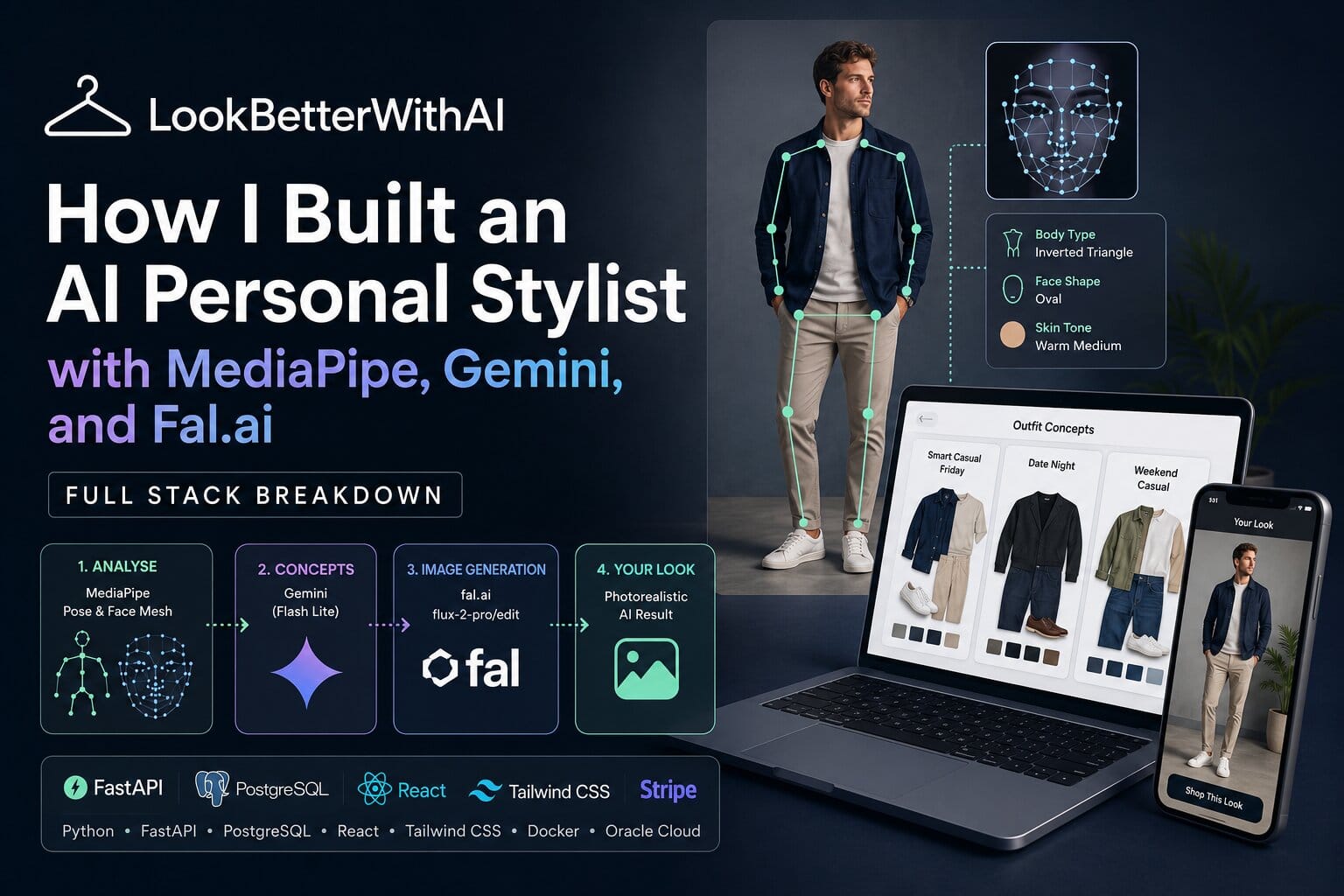
AI personal stylist app architecture gets difficult when the product has to do more than generate outfit ideas. It has to analyse body proportions, read face shape and skin tone, create a realistic outfit preview, find real products, and keep the interface responsive while several AI calls run in the background.
This article breaks down a practical architecture for building that kind of app using MediaPipe, Gemini, Fal.ai Flux, FastAPI, React, PostgreSQL, Docker Compose, Ghost CMS, and Server-Sent Events. We’ll use LookBetterWithAI as the live reference point because it shows the full flow working in production.
The best AI personal stylist app architecture is not one huge prompt. The reliable pattern is a staged pipeline: computer vision extracts structured body and face data, an LLM turns that data into outfit concepts, an image model generates the preview, and a shop pipeline validates real products against the generated look. The key is keeping every AI stage narrow, testable, and recoverable. That is how you get useful styling output without making the user wait in silence or trust an unverified hallucination.
Why This Problem Exists
AI styling apps fail when they treat personal style as a single text-generation problem. A prompt like “suggest an outfit for this person” sounds simple, but it gives the model too much freedom and too little structured information. The result is usually generic advice, inconsistent recommendations, and product matches that look close in words but wrong in the image.
The market is moving fast, but developer trust has not caught up. Stack Overflow’s 2025 Developer Survey says 84% of respondents are using or planning to use AI tools in their development process, and 51% of professional developers use AI tools daily. The same survey also found Python at 57.9% usage across respondents, which explains why Python remains a strong fit for AI, computer vision, and backend work. (Stack Overflow Insights)
The trust problem matters even more in visual AI. Stack Overflow reported that 46% of developers do not trust the accuracy of AI tool output, up from 31% the previous year. Prashanth Chandrasekar, Stack Overflow’s CEO, put it clearly: “AI is a powerful tool, but it has significant risks of misinformation.” (Stack Overflow Business)
That is why a production AI styling app needs deterministic anchors. Body measurements, landmark ratios, colour data, wardrobe ownership, product category, price, and shop availability should live as structured data. The LLM should reason over that data. It should not invent it.
This is the same principle we use when building AI products at Hitori Tech. You can read our broader business view in AI in Harrow Businesses, but the engineering rule is simple: use AI where judgement is needed, and use code where correctness is needed.
The Solution: AI Personal Stylist App Architecture
The clean architecture is a staged system with clear boundaries. Each stage owns one job, stores its result, and passes structured data to the next stage.
A practical stack looks like this:
| Layer | Technology | Job |
|---|---|---|
| Backend API | FastAPI, SQLAlchemy async, asyncpg | User flows, AI orchestration, plan limits, streaming |
| Database | PostgreSQL 16 | Profiles, measurements, generations, products, cache |
| Computer vision | MediaPipe Pose, MediaPipe Face Mesh, OpenCV, NumPy | Body landmarks, face ratios, skin tone sampling |
| Concept generation | Gemini Flash Lite | Outfit concepts, rationale, structured JSON |
| Image generation | Fal.ai Flux edit model | Photorealistic outfit preview from reference images |
| Frontend | React, Vite, Tailwind, PWA | Upload flow, generated looks, chat, shop cards |
| CMS | Ghost 5 headless | Styling context, occasion pages, content support |
| Infrastructure | Docker Compose, Nginx, Certbot | Single-VM deployment, SSL, reverse proxy |
| Payments | Stripe | Plans, credits, subscription control |
Step 1 is to extract body metrics before any LLM call. MediaPipe Pose is a good fit because Google’s documentation says the Pose Landmarker detects landmarks of human bodies in images or video and outputs pose landmarks in image coordinates and 3D world coordinates. Its model tracks 33 body landmark locations, including shoulders, hips, elbows, knees, and wrists. (Google for Developers)
For a styling app, the useful measurements are shoulder width, hip width, torso length, arm length, inseam estimate, and proportional ratios. The body type classification then becomes a styling input. An inverted triangle frame needs different silhouette logic from a pear shape or rectangle frame.
import cv2
import mediapipe as mp
import numpy as np

mp_pose = mp.solutions.pose

def extract_body_metrics(image_bytes: bytes, height_cm: float | None = None) -> dict:
    nparr = np.frombuffer(image_bytes, np.uint8)
    img = cv2.imdecode(nparr, cv2.IMREAD_COLOR)
    img_rgb = cv2.cvtColor(img, cv2.COLOR_BGR2RGB)
    h, w = img.shape[:2]

    with mp_pose.Pose(static_image_mode=True, model_complexity=2) as pose:
        results = pose.process(img_rgb)

    if not results.pose_landmarks:
        raise ValueError("No pose detected")

    lm = results.pose_landmarks.landmark

    def distance(a: int, b: int) -> float:
        return np.sqrt(
            ((lm[a].x - lm[b].x) * w) ** 2 +
            ((lm[a].y - lm[b].y) * h) ** 2
        )

    shoulder_px = distance(11, 12)
    hip_px = distance(23, 24)

    scale = height_cm / h if height_cm else 0.026
    shoulder_cm = shoulder_px * scale
    hip_cm = hip_px * scale

    ratio = shoulder_cm / hip_cm if hip_cm else 1.0

    return {
        "shoulder_cm": round(shoulder_cm, 2),
        "hip_cm": round(hip_cm, 2),
        "shoulder_hip_ratio": round(ratio, 2),
        "body_type": classify_body_type(ratio)
    }
Step 2 is to analyse the face separately. MediaPipe Face Mesh returns 468 face landmarks, with each face represented as x, y, and z landmark coordinates. That makes it useful for face width, face length, jaw width, forehead width, eye spacing, and facial proportion analysis. (GitHub)
The important decision is to keep face analysis structured. Store the face shape, landmark ratios, hair colour, skin tone label, and skin tone hex value. For colour work, sampling cheek regions and averaging LAB or RGB values is more useful than asking an LLM to describe the person from an image. It gives the recommendation engine something consistent to reason with.
Step 3 is to generate outfit concepts with Gemini. Gemini is strongest here when the prompt is strict and the output schema is fixed. Google’s Gemini 2.5 Flash-Lite documentation lists structured outputs as supported and gives an input token limit of 1,048,576 with an output token limit of 65,536, which is enough for a full profile, occasion rules, wardrobe context, and product constraints. (Google AI for Developers)
A good concept response should return three outfit options with a title, rationale, colour palette, style vibe, key pieces, owned wardrobe status, and an image-generation prompt. The LLM should not return loose prose that the frontend has to scrape.
{
  "title": "Smart Casual Friday",
  "rationale": "Your broader shoulder line works best with relaxed structure and balanced lower-body volume.",
  "color_palette": ["#2C3E50", "#ECF0F1", "#C98A42"],
  "style_vibe": "clean smart casual",
  "key_pieces": [
    {
      "label": "stone slim chino",
      "category": "bottom",
      "colour": "stone",
      "why_this_piece": "Adds balance below the waist without looking oversized.",
      "recommended": true,
      "owned": false
    }
  ],
  "flux_prompt": "Photorealistic full-body fashion image of the same person wearing stone slim chinos and a navy Oxford shirt."
}
Step 4 is to generate the outfit preview using a dedicated image model. In the LookBetterWithAI flow, the user chooses one of the generated concepts, then the system sends the full-body image, face reference, and outfit prompt to Fal.ai’s Flux edit endpoint. Fal’s current Flux 2 Pro edit API accepts image URLs and supports Base64 data URIs for file input. It also warns developers not to expose the FAL_KEY in client-side code and recommends a server-side proxy for browser-based apps. (Fal AI)
That server-side boundary is not optional. A fashion app handles personal photos, payment state, and paid generation credits. API keys, plan checks, and image-generation calls belong in the backend.
Step 5 is to stream progress instead of blocking the request. Image generation can take long enough for users to assume the app has frozen. Fal’s documentation recommends queue status checks and webhooks for long-running requests rather than blocking while waiting for completion. (Fal AI)
Server-Sent Events are a clean fit because the browser only needs one-way updates from the server. The backend can return a generation ID immediately, start the image job in the background, and stream events such as generating, progress, done, or error.
@router.get("/generation-stream/{generation_id}")
async def stream_generation(generation_id: str):
    async def event_generator():
        gen = await get_generation(generation_id)

        if gen and gen.status == "done":
            yield f"data: {json.dumps({'type': 'done', 'image_url': gen.image_url})}\n\n"
            return

        queue = get_generation_queue(generation_id)

        while True:
            event = await queue.get()
            yield f"data: {json.dumps(event)}\n\n"

            if event["type"] in ("done", "error"):
                break

    return StreamingResponse(event_generator(), media_type="text/event-stream")
Step 6 is to add a product pipeline after the image is ready. This is where many AI fashion apps fall apart. It is easy to generate a nice outfit. It is harder to find real products that match the generated pieces.
The safer pattern is a three-layer search system. First, check a query cache with a sensible TTL. Second, search a local product pool stored in PostgreSQL using category, colour, brand, and price metadata. Third, call a live shopping API only when the cache and local pool miss.
After fetching products, validate them with vision. The validation model should compare the generated outfit image against the product image and reject anything with the wrong category, colour, or style. That prevents the classic “navy chino” search returning black jeans or formal trousers.
Step 7 is to make the frontend feel instant even when the backend is busy. React, Vite, and Tailwind are enough for the interface, but the PWA details matter. Web.dev’s PWA installation guide explains that most browsers use a Web App Manifest and installability criteria to decide when a web app can be installed. On desktop, Chrome and Edge can show an install badge when a site is installable. (web.dev)
For an AI stylist, PWA support is useful because the upload flow is phone-heavy. Users take body and face photos on mobile. Convert image files to Base64 data URLs immediately after file selection, before storing them in React state. Mobile browsers can kill and restore JavaScript context during camera capture, which can invalidate File objects if you wait too long.
AI Styling Pipeline Compared With Simpler Options
A staged AI personal stylist app architecture takes more work than a single prompt, but it gives you better control, better debugging, and better user trust.
| Approach | Build complexity | Output quality | Best use case | Main weakness |
|---|---|---|---|---|
| Single multimodal prompt | Low | Low to medium | Prototype or demo | Generic advice and weak repeatability |
| LLM plus product search only | Medium | Medium | Outfit recommendation without try-on | No visual proof of the final look |
| Computer vision plus LLM plus image generation | High | High | Personal styling, virtual try-on, paid AI app | Needs careful orchestration and cost control |
| Native app first | High | High | Heavy camera use and device features | Slower launch and more platform maintenance |
| PWA plus backend AI pipeline | Medium to high | High | Fast launch with mobile upload support | Browser quirks need testing |
For most startups, the PWA plus backend AI pipeline is the best first serious build. You can validate the product without waiting for App Store approval, while still giving users a polished mobile experience. When the core retention is proven, a native app can follow.
If you’re planning this kind of product and need a team to design the backend, frontend, AI orchestration, and hosting properly, Hitori Tech’s software development services cover exactly that mix.
Common Mistakes and How to Avoid Them
The most common mistake is letting the LLM invent measurements. A model can describe an uploaded image, but that does not mean it has measured the person correctly. Use MediaPipe or another computer vision layer first, then pass ratios and labels into the model.
The second mistake is making the HTTP request wait for the whole generation. A 15-second request feels broken on the frontend, and it becomes fragile behind proxies and load balancers. Store the generation row, run the task in the background, stream progress, and replay the completed result if the user refreshes.
The third mistake is showing unvalidated shop products. Search APIs are useful, but text matching is not enough for styling. Validate product images against the generated look before displaying them. It adds cost, but it protects user trust.
The fourth mistake is exposing AI provider keys in the browser. Fal’s own documentation warns developers not to expose the FAL_KEY client-side. The same rule applies to Gemini, Stripe, shopping APIs, and admin endpoints. Put secrets behind your FastAPI backend and use the frontend only for authenticated user actions. (Fal AI)
Another mistake is building every workflow into the app code. Occasion context, seasonal style guides, and trend pages can live in Ghost CMS. If a route does not have a static prompt file, the backend can fetch a Ghost post by slug and use it as contextual input. That lets the content team add “wedding guest”, “date night”, or “winter workwear” logic without a deployment.
The same idea applies to operations. If you need internal approval flows, product import checks, or notification workflows around an AI product, Hitori Tech’s n8n automation service can connect those systems without hardcoding every admin task into the main app.
Real-World Example: LookBetterWithAI
LookBetterWithAI is a useful production example because it combines computer vision, LLM reasoning, photorealistic generation, product search, and chat in one flow. It is not just an outfit text generator. The user uploads photos, receives structured body and face analysis, gets three outfit concepts, picks a look, sees a generated preview, and then receives real product suggestions.
The architecture reviewed for this article runs as seven Docker Compose containers on a single Oracle Cloud VM: API, frontend, PostgreSQL, Nginx, Ghost, admin, and Certbot. The backend uses FastAPI and async SQLAlchemy. The frontend uses React, Vite, Tailwind, and PWA support. Ghost runs headless for styling context and content.
The end-to-end pipeline takes about 25 to 35 seconds from upload to product-ready result, with image generation accounting for about 15 seconds. That timing is acceptable because the app streams progress instead of leaving the user with a static spinner. It also only decrements generation credits when the Fal.ai call succeeds, which is the right billing behaviour for a credit-based AI product.
That is the difference between a fun AI demo and a product someone can use. The demo proves the model can generate something impressive once. The product handles failures, refreshes, quotas, cached products, paid credits, wardrobe ownership, and real user impatience.
Frequently Asked Questions
What is the best architecture for an AI personal stylist app?
The best architecture for an AI personal stylist app is a staged pipeline with computer vision, structured LLM output, image generation, product validation, and streaming progress. Do not ask one model to do everything. Extract body and face data first, then let the LLM make styling decisions from structured inputs.
How does MediaPipe help with AI styling?
MediaPipe helps by turning uploaded body and face photos into measurable landmarks. Pose landmarks can support shoulder, hip, torso, and limb ratios, while Face Mesh can support face shape and skin tone analysis. That gives the styling model real inputs instead of vague visual guesses.
Why use Gemini for outfit concepts instead of image generation?
Gemini is better suited to reasoning, structured JSON, product explanations, and styling logic. Image generation should be handled by a specialised image model such as Flux. Keeping those jobs separate makes the system easier to test and cheaper to debug.
Which database should an AI fashion app use?
PostgreSQL is a strong default for an AI fashion app because it handles user profiles, measurements, wardrobe items, generations, products, cache rows, and billing references in one reliable system. You can add vector search or object storage later, but relational data should stay relational.
Can Hitori Tech build an AI styling or visual AI app?
Yes. Hitori Tech can build AI apps that combine web development, computer vision, LLM orchestration, DevOps, payments, and automation. If you are building a visual AI product, start with a clear pipeline design and talk to us through the Hitori Tech contact page before you spend money on the wrong architecture.
A strong AI personal stylist app architecture is boring in the right places and smart in the right places. Measurements, plans, credits, products, and state should be deterministic. Styling judgement, image generation, and conversational help are where AI earns its keep.
If you are building a product like LookBetterWithAI, start with the pipeline before you start tuning prompts. Hitori Tech can help you design the system, ship the first version, and keep the infrastructure stable as real users arrive.